

Choosing the right network load balancer means understanding your specific needs and environment first. You should consider whether you need a Layer 4 balancer for fast, basic routing or Layer 7 for detailed application-level handling like session persistence and SSL termination. Think about your deployment, cloud-native options offer easy scaling, while hardware or software choices might suit on-prem setups better. Features matter too: health checks ensure traffic isn’t sent to failing servers, and advanced algorithms help distribute load efficiently based on server capacity or response times. Security features such as DDoS protection or SSL offloading can be crucial depending on your use case. Ultimately, balance performance needs with budget and integration ease for a reliable setup.
Understanding Network Load Balancers and Their Layers
Network Load Balancer plays a critical role in managing incoming traffic by distributing it across multiple servers, ensuring efficient resource use and preventing server overload. They mainly operate at two OSI layers: Layer 4 (Transport Layer) and Layer 7 (Application Layer). Layer 4 load balancers route traffic based on IP addresses and TCP or UDP ports, offering fast, low-latency handling without inspecting the packet content. This makes Layer 4 ideal for simple, high-speed routing tasks where deep packet analysis is unnecessary. On the other hand, Layer 7 load balancers dive into application-level data such as HTTP headers, URLs, and cookies, enabling more granular control. This allows features like content-based routing, SSL termination, and session persistence, which are essential for complex web applications needing user-specific behavior. Load balancers come in various forms: hardware appliances provide dedicated performance and enhanced security but lack flexibility; software load balancers run on general-purpose servers or virtual machines, offering customization and adaptability, especially for on-premises or virtualized environments. Meanwhile, cloud-native load balancers are managed services integrated with cloud platforms, providing scalability and simplified maintenance. Choosing between Layer 4 and Layer 7 depends on your application’s complexity and performance needs, for example, a simple TCP service might only require Layer 4, while a web app with user sessions benefits from Layer 7’s advanced routing capabilities.
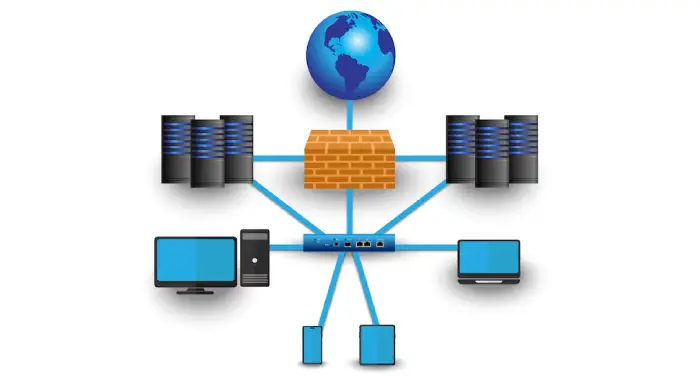
Choosing the Right Load Distribution Algorithm
Selecting the right load distribution algorithm is crucial for optimizing your network load balancer’s performance and resource use. Round Robin is straightforward, cycling requests evenly across all servers, but it works best when servers have equal capacity. If your servers differ in power or resources, Weighted Round Robin lets you assign traffic proportionally based on their capacity, avoiding overload on weaker nodes. Least Connections is practical when request load varies, as it sends traffic to the server with the fewest active connections, balancing uneven workloads effectively. Least Response Time prioritizes servers responding the fastest, which can reduce latency and improve user experience, especially for latency-sensitive applications. IP Hash is useful when session persistence is needed without relying on sticky sessions, as it consistently routes clients based on their IP addresses. Random distribution is simple but generally not recommended because it can cause unpredictable load spikes and uneven resource use. For dynamic environments, Resource-Based algorithms consider real-time server metrics like CPU and memory usage, adapting traffic flow to current server health. Some advanced load balancers allow combining or dynamically switching algorithms to suit changing conditions. Ultimately, your choice depends on your application’s needs, server capacity, and whether you require session handling. Picking the right algorithm directly impacts system responsiveness and efficient use of resources.
Health Checks and Failover Mechanisms
Network load balancers rely heavily on health checks to ensure traffic is only directed to servers that are available and performing well. These health checks can range from simple pings or TCP port tests to more advanced HTTP response validations or application-specific probes that verify deeper functionality. When a server fails or responds slowly, it is automatically removed from the load balancing pool to prevent user requests from reaching problematic instances. Failover mechanisms are crucial in this process, instantly rerouting traffic to healthy servers to maintain uptime and consistent user experience. Depending on the architecture, failover can be configured in active-passive mode, where standby servers take over when primaries fail, or active-active mode, where all servers handle traffic simultaneously with dynamic redistribution during failures. Customizing health check intervals and thresholds allows you to balance between detecting issues quickly and avoiding false alarms that could unnecessarily divert traffic. Some advanced load balancers support layered health checks combining network-level and application-level probes to provide a more accurate assessment of server health. Automated failover reduces the need for manual intervention, which is especially valuable during unexpected outages or scheduled maintenance. Additionally, monitoring the health status helps identify backend problems early, preventing user impact. However, it’s important to fine-tune health check settings carefully, misconfiguration can lead to false positives or negatives, causing either traffic to be sent to unhealthy servers or healthy servers to be excluded, both of which can degrade the overall service quality.
- Load balancers perform continuous health checks to monitor server availability and performance.
- Health checks can be simple (ping, TCP port check) or complex (HTTP response validation, application-specific probes).
- Unhealthy servers are automatically removed from the pool to prevent traffic routing to failed or slow instances.
- Failover mechanisms reroute traffic instantly to healthy servers to maintain uptime and user experience.
- Health checks can be customized in intervals and thresholds to balance sensitivity and stability.
- Some load balancers support layered health checks combining network and application-level checks.
- Failover can be active-passive or active-active depending on deployment and redundancy design.
- Automated failover reduces manual intervention during server failures or maintenance.
- Monitoring health status helps identify backend issues early before affecting users.
- Proper configuration of health checks is critical to avoid false positives or negatives impacting traffic routing.
Session Persistence Options for Stateful Applications
Session persistence ensures user requests within the same session are consistently routed to the same backend server, which is critical for stateful applications like e-commerce shopping carts, banking portals, or user profile management. One common method is cookie-based persistence, where the load balancer inserts a cookie identifying the assigned server. This approach works well for HTTP traffic, allowing the load balancer to recognize returning users and direct their requests accordingly. Another method is IP-based persistence, which uses the client’s IP address to maintain routing consistency. However, this can be unreliable for users behind proxies or NAT, where IP addresses may change or be shared among many clients. Some advanced load balancers support session replication between servers, reducing strict dependency on persistence by synchronizing session state across multiple backend nodes. Choosing the right persistence method depends on your application’s architecture and user behavior. For example, web apps with stable HTTP sessions benefit from cookie-based persistence, whereas non-HTTP protocols or simpler setups might lean toward IP-based methods. Layer 7 load balancers offer more sophisticated options by inspecting application data to maintain session integrity. It’s important to configure persistence carefully, as improper settings can cause uneven load distribution and affect scalability. Ultimately, selecting the right session persistence strategy helps maintain user experience without compromising performance or resource utilization.
Benefits of SSL Termination in Load Balancing
SSL termination shifts the heavy lifting of encryption and decryption from backend servers to the load balancer, which helps improve overall server performance and reduces latency for HTTPS traffic. By handling SSL certificates and key management centrally, load balancers simplify administration and reduce the risk of certificate duplication or errors. This central point of termination also enables advanced Layer 7 features such as content-based routing and traffic inspection on decrypted data, which wouldn’t be possible if the traffic remained encrypted. Additionally, terminating SSL at the load balancer allows seamless integration with security tools like web application firewalls (WAFs), enhancing overall security posture. For organizations requiring end-to-end encryption, many load balancers can re-encrypt traffic after termination, maintaining data protection while still benefiting from offloading. Performance improvements are especially evident when managing large volumes of encrypted traffic, as modern load balancers support up-to-date protocols and cipher suites to ensure compliance and security. If direct encryption to backend servers is necessary, some load balancers also support SSL passthrough, forwarding encrypted traffic without decrypting it, offering flexibility based on security needs.
Traffic Prioritization and Quality of Service Features
Network load balancers equipped with traffic prioritization and Quality of Service (QoS) features play a crucial role in maintaining consistent performance for latency-sensitive applications like VoIP and video conferencing. These load balancers classify traffic based on protocols, ports, or even application data, allowing critical traffic to be prioritized over less time-sensitive flows. Features such as bandwidth shaping and rate limiting help control the flow of traffic, preventing any single application from dominating available resources. This prioritization directly reduces jitter, packet loss, and latency, which are vital for maintaining call clarity and smooth video streams. In mixed-traffic environments, QoS support ensures fair distribution of network resources, improving overall user experience. Some advanced load balancers also enable dynamic prioritization policies that adjust based on time of day or current network conditions, providing flexibility to match changing workload demands. Integration with broader network QoS policies extends this traffic management beyond the load balancer itself, enhancing end-to-end service quality. Proper implementation of these features not only improves critical application performance but also enhances overall network efficiency and user satisfaction.
Comparing Hardware, Software, and Cloud Load Balancers
Hardware load balancers are dedicated physical devices designed for high throughput and low latency, making them suitable for environments where performance and reliability are critical. They often come with advanced capabilities like hardware SSL acceleration and integrated security features, which help offload processing from backend servers and enhance protection against threats. However, these benefits come with higher upfront and maintenance costs, and they lack the flexibility needed for rapidly changing or cloud-based environments. On the other hand, software load balancers run on general-purpose servers or virtual machines, offering a high degree of customization and protocol support. Examples like Nginx, HAProxy, and Traefik are popular choices that work well in on-premises, virtualized, and containerized setups. Software solutions provide flexibility to adjust configurations and scale with your infrastructure but may require more hands-on management compared to hardware appliances. Cloud load balancers, such as AWS Elastic Load Balancer, Google Cloud Load Balancing, and Azure Load Balancer, are managed services that simplify deployment and scaling by automatically adjusting to changing traffic patterns. They reduce operational overhead by handling maintenance, updates, and failover, making them ideal for dynamic or hybrid cloud environments. Although cloud load balancers offer elasticity and easy integration with other cloud services, they often provide less customization than software or hardware options. Ultimately, the choice depends on your specific needs: hardware load balancers excel in performance and security but at a higher cost and lower flexibility; software load balancers offer adaptability and control, fitting diverse on-prem and virtual environments; cloud load balancers deliver simplicity and scalability with less management effort, best suited for cloud-first strategies.
Exploring Application Delivery Controllers and Modern Architectures
Application Delivery Controllers (ADCs) have evolved beyond simple load balancing to include security and performance optimization features such as web application firewalls (WAF), DDoS protection, SSL offloading, caching, and compression. Solutions like F5 BIG-IP LTM, Citrix ADC, and A10 Thunder ADC provide these capabilities in a unified platform, making them suitable for enterprises requiring advanced traffic management alongside enhanced security. Meanwhile, modern architectures increasingly rely on service meshes, especially in microservices environments, where sidecar proxies enable fine-grained routing, resilience, and observability within containerized applications. Service meshes integrate closely with container orchestration platforms such as Kubernetes, leveraging ingress controllers and native load balancing to support dynamic traffic management. Both ADCs and service meshes are designed to handle multi-cloud and hybrid deployments, offering centralized control and consistent policy enforcement across diverse environments. Integration with CI/CD pipelines allows automated deployment and configuration of load balancing rules, improving agility and reducing manual errors. Advanced ADCs also provide analytics and reporting features that help optimize traffic flows and detect anomalies early. Overall, modern load balancing solutions emphasize flexibility, security, and seamless integration with cloud-native infrastructures, making them integral to scalable and resilient application delivery.
Network Edge and WAN Load Balancing Techniques
WAN load balancing plays a crucial role in distributing traffic across multiple Internet service providers (ISPs) to ensure both redundancy and improved performance. By using multi-WAN load balancers, organizations prevent a single ISP failure from disrupting connectivity, maintaining consistent network availability. Session-aware load balancers enhance this by grouping related TCP sessions together, preserving application integrity and ensuring that user experiences, such as banking or e-commerce sessions, remain stable and uninterrupted. Transparent passthrough installations are another valuable technique, allowing load balancers to integrate without requiring major network redesigns and enabling coexistence with existing network devices. Packet-level bonding further boosts throughput by spreading packets of a single session over multiple links, effectively combining bandwidth for higher speeds. Overlay tunnels optimize traffic routing by dynamically adjusting based on measured latency, jitter, and packet loss, which is especially beneficial for real-time applications like VoIP and video streaming. At the network edge, load balancing directs traffic from distributed or remote users to the nearest data centers, minimizing delays and improving application responsiveness. Edge-based WAN optimizations often include compression and caching, reducing bandwidth usage and enhancing performance. Intelligent failover mechanisms at the WAN edge automatically switch traffic to healthy links during failures, maintaining service continuity without manual intervention. These advanced techniques collectively improve network resilience, performance, and user experience, making them essential considerations when choosing a load balancer for WAN and edge deployments.
Matching Load Balancer Type to Traffic and Layer Needs
Selecting the right load balancer starts with understanding your traffic and application layer requirements. Layer 4 load balancers are ideal if you need high-performance routing for TCP or UDP traffic without inspecting packet content. They work fast by directing traffic based on IP addresses and ports, making them suitable for simple, high-throughput scenarios like DNS, gaming, or VoIP services. On the other hand, Layer 7 load balancers are better when you deal with HTTP or HTTPS traffic that requires content-based routing, session management, or SSL termination. For example, web applications needing sticky sessions or URL-based routing benefit from Layer 7 features like cookie-based persistence or header inspection.
Traffic volume and peak load patterns also influence your choice. Cloud-native load balancers shine in environments with variable workloads because they scale elastically, automatically adjusting capacity to meet demand. In contrast, on-premises deployments may lean toward hardware or software load balancers for greater customization and control, though they require careful capacity planning. If security is a priority, consider load balancers or Application Delivery Controllers (ADCs) that offer integrated Web Application Firewall (WAF) and Distributed Denial of Service (DDoS) protection to safeguard your applications without adding complexity.
Compatibility with your existing infrastructure and orchestration tools is another key factor. For instance, if you’re running containerized workloads with Kubernetes, choosing a load balancer that integrates smoothly with ingress controllers or service meshes can simplify management. Also, think about cost models: hardware solutions often demand upfront investment and ongoing maintenance, while cloud services typically provide pay-as-you-go pricing that can be more budget-friendly for fluctuating traffic.
Ultimately, aligning your load balancer type with your application’s protocol needs, traffic patterns, deployment environment, and security requirements ensures you get the best balance of performance, reliability, and cost-efficiency. For example, a high-volume e-commerce site handling millions of HTTP requests daily would benefit from a Layer 7 cloud-native load balancer with session persistence and SSL offloading, whereas a UDP-based gaming platform might prioritize a fast Layer 4 load balancer deployed on-premises for low latency and control.
Scalability, Performance, and Deployment Environment Factors
When selecting a network load balancer, understanding your scalability needs is crucial. Start by evaluating your expected traffic volume and peak loads to ensure the load balancer can handle demand without bottlenecks. For environments with fluctuating traffic, cloud-native load balancers that support auto-scaling offer dynamic adjustment to traffic spikes, reducing the risk of overload. Hardware load balancers typically deliver high throughput and low latency but require upfront capacity planning, which can be costly and less flexible. On the other hand, software load balancers provide greater flexibility, running on commodity servers or virtual machines, making them ideal for environments that need quick adaptation or cost efficiency.
Performance considerations also hinge on the layer at which the load balancer operates. Layer 4 load balancers are faster because they route traffic based on IP and port information, suitable for simple TCP/UDP workloads with strict latency requirements. Layer 7 load balancers, while introducing more overhead, enable granular control through content-based routing, SSL termination, and session persistence, which are essential for complex web applications.
The deployment environment heavily impacts your choice. On-premises setups often lean toward hardware or software load balancers for control and integration with existing infrastructure. Cloud environments, however, benefit from managed load balancing services that offer simplified deployment, elastic scaling, and reduced operational overhead. For organizations operating in multi-cloud or hybrid settings, selecting load balancers that provide unified traffic management and automatic failover is vital to maintain seamless user experience and reliability.
Additionally, consider advanced architectures like service meshes with sidecar proxies if you’re managing microservices. These provide sophisticated traffic control and resilience beyond traditional load balancing. Geographic load balancing is another factor if your user base is dispersed globally; routing users to the nearest data center can significantly reduce latency and improve overall performance. Balancing these scalability, performance, and deployment factors will guide you to a load balancer that aligns with your operational needs and growth plans.
Security Features to Look for in Load Balancers
When selecting a network load balancer, prioritizing security features is essential to protect both your infrastructure and user data. Look for SSL/TLS termination capabilities that allow the load balancer to handle encryption and decryption tasks, reducing the load on backend servers and improving overall performance. Integration with a Web Application Firewall (WAF) is another crucial feature, as it helps defend against common web attacks like SQL injection and cross-site scripting. DDoS protection mechanisms, such as rate limiting and traffic filtering, are important for maintaining service availability during attack attempts. Advanced security options like IP reputation-based blocking and anomaly detection provide proactive defense by identifying and blocking suspicious traffic patterns. Secure health checks ensure the load balancer only routes traffic to safe, uncompromised servers, preventing possible breaches through unhealthy nodes. Compatibility with network security tools such as Intrusion Detection and Prevention Systems (IDS/IPS) supports a layered defense strategy, enhancing your overall security posture. For protecting session data, features like encrypted cookies or secure sticky sessions help maintain confidentiality and prevent session hijacking. Operational security is improved by role-based access control (RBAC) and audit logging, which help manage user permissions and provide traceability for compliance purposes. Support for mutual TLS authentication adds an extra layer of trust by verifying both client and load balancer identities during connections. Lastly, regular patching and vulnerability management practices are vital to keep your load balancer up to date against emerging threats and security flaws. For example, a load balancer integrated with a WAF and DDoS protection has proven effective in blocking large-scale attacks while maintaining user experience during peak traffic times.
Cost Considerations for Different Load Balancer Types
When choosing a network load balancer, understanding the cost implications is critical. Hardware load balancers typically require a significant upfront investment for the physical devices and ongoing expenses for maintenance and support. Scaling hardware solutions often means purchasing additional or upgraded units, which can be costly and time-consuming. On the other hand, software load balancers offer a more budget-friendly option, especially with open-source solutions like HAProxy or Nginx. However, they may require skilled staff for setup and management, which adds indirect costs through personnel time and training. Cloud load balancers follow a pay-as-you-go pricing model, making them ideal for environments with variable or unpredictable traffic. They automatically scale with demand, but costs can rise with increased usage, so monitoring is essential to avoid surprises. Managed cloud load balancers reduce the operational burden on IT teams by handling updates and support, though advanced features often come at a premium. Beyond the initial price, consider the total cost of ownership, including licensing, support, integration with existing infrastructure, and orchestration tools. Additional security features like web application firewalls (WAF) or DDoS protection may be included or require extra fees, impacting the overall budget. Finally, factor in disaster recovery and redundancy costs to maintain uptime and avoid revenue loss during outages. Balancing these cost factors against your performance and security needs will guide you toward the most cost-effective load balancing solution for your environment.
Integrations and Vendor Ecosystem Compatibility
When selecting a network load balancer, it’s important to consider how well it integrates with your existing and planned infrastructure. Compatibility with orchestration platforms like Kubernetes ingress controllers and service meshes is essential, especially if you rely on containerized environments or microservices architectures. A load balancer that supports CI/CD pipelines can streamline updates and configuration changes, helping you automate deployments without manual intervention. Integration with monitoring and observability tools such as Prometheus and Grafana allows you to track performance metrics and quickly identify issues. Vendors offering rich ecosystems with plugins, APIs, and extensions give you the flexibility to customize load balancing behavior to fit unique requirements. For organizations adopting multi-cloud or hybrid cloud strategies, choosing a load balancer that supports seamless operation across different environments helps avoid vendor lock-in and enhances resilience. It’s also critical to ensure smooth integration with your security infrastructure, including web application firewalls (WAFs) and intrusion detection/prevention systems (IDS/IPS), to maintain a strong security posture. Assess the vendor’s documentation quality, community support, and availability of training resources, as these factors contribute to a smoother implementation and ongoing management experience. Finally, consider interoperability with CDN providers and edge computing platforms if optimized content delivery is a priority. Vendors with mature ecosystems that provide managed services, professional support, and regular software updates can offer added confidence and reduced operational burden.
Addressing Common Load Balancer Challenges
One key challenge with load balancers is scalability limits. To handle growing traffic without disruption, implementing active-active or clustered load balancer setups allows traffic to distribute evenly and prevents bottlenecks. DDoS attacks are another concern; many load balancers offer built-in protections like rate limiting and can integrate with external security services such as WAFs or IDS/IPS to block malicious traffic effectively. Session persistence can be tricky, especially for stateful applications. Using reliable methods like cookie-based or IP hash persistence helps maintain consistent user sessions and avoids dropped or rerouted connections. Misconfigured health checks might cause traffic to be sent to unhealthy or overloaded servers, reducing application availability. Careful tuning of health probes ensures that only healthy backend servers receive traffic, improving overall reliability. Continuous monitoring of load balancer performance is essential to catch bottlenecks or failures early, using tools like Prometheus or Grafana for real-time insights. Redundancy should be built into both the load balancer and backend servers to avoid single points of failure, ensuring high availability even during component outages. Regularly updating and patching load balancer software protects against security vulnerabilities that could be exploited. Compatibility with application requirements is vital; a load balancer must support necessary routing rules and session handling to prevent errors or degraded user experience. Testing failover and disaster recovery procedures regularly verifies the resilience of your setup and prepares you for unexpected incidents. Finally, dynamic traffic distribution based on real-time server health and performance metrics keeps load balanced efficiently, adapting to changes in backend capacity or response times.
Best Practices for Monitoring and Maintaining Load Balancers
Effective monitoring and maintenance are key to ensuring your load balancer delivers consistent performance and reliability. Utilize monitoring tools like Prometheus and Grafana to track essential metrics such as throughput, latency, and error rates. Setting up alerts for unusual patterns, including server failures, sudden traffic spikes, or potential security incidents, allows for quick response and minimizes downtime. Implement auto-scaling policies to automatically adjust capacity during traffic surges, preventing overload and maintaining smooth user experiences. Regular health checks and audits of backend servers and load balancer configurations help detect and resolve issues before they impact service. Maintaining redundancy through multiple load balancers in active-active or active-passive modes ensures high availability and fault tolerance. Security should be prioritized by applying timely patches, updating SSL/TLS certificates, and enforcing strict network access controls. Periodically review and optimize load distribution algorithms to align with changing traffic patterns and backend capacity, which helps balance loads more effectively. Incorporate load balancers into your disaster recovery and business continuity plans with clear, documented procedures for failover and recovery. Logging and analyzing traffic patterns not only aids in detecting long-term trends and optimizing routing decisions but also strengthens security by revealing suspicious activities. Conduct capacity planning and performance testing regularly to prepare for future growth and evolving application demands, ensuring your load balancing infrastructure scales efficiently without surprises.
Overview of Leading Load Balancing Solutions
When selecting a network load balancer, it’s helpful to understand the strengths of top solutions available today. Enterprise-grade ADCs like F5 BIG-IP LTM offer robust hardware and software combined with advanced traffic management and security features, making them ideal for large organizations with complex needs. Citrix ADC (formerly NetScaler) focuses on software flexibility and supports hybrid and multi-cloud environments, delivering intelligent load balancing and broad integration options. A10 Thunder ADC stands out by combining high-performance Layer 4 to Layer 7 load balancing with multi-layer security, suitable for demanding applications. On the software side, Nginx Plus provides a versatile load balancer supporting HTTP, TCP, and UDP protocols, with flexibility for both on-premises and cloud deployments. Cloud-native options like AWS Elastic Load Balancer (including ALB, NLB, and Gateway Load Balancer) offer managed services with seamless auto-scaling and deep integration into the AWS ecosystem, simplifying deployment and management. Google Cloud Load Balancing brings a global, fully managed solution designed for high availability and low latency, while Azure Load Balancer offers regional and global capabilities supporting TCP/UDP and HTTP(S) traffic, fitting well in Microsoft-centric environments. For modern containerized and microservices architectures, Traefik provides a cloud-native load balancer optimized for dynamic, service-oriented setups. It’s important to note that F5 and Citrix come with extensive vendor ecosystems and support, which can be critical for complex enterprise environments. Meanwhile, cloud solutions excel in ease of deployment and elasticity but might lack some advanced features found in dedicated hardware or software ADCs. Choosing the right load balancer depends on your specific deployment model, required features, and integration needs.
Frequently Asked Questions
1. What factors should I consider to ensure a network load balancer matches my application’s traffic needs?
You should assess the expected traffic volume, peak loads, and whether your application needs to handle sudden traffic spikes. Also, consider the type of protocols used, like TCP or HTTP, and the geographical spread of your users to choose a load balancer that can efficiently distribute traffic across your resources.
2. How do different load balancing algorithms impact performance and reliability?
Load balancing algorithms, such as round-robin, least connections, or IP hash, determine how traffic is distributed. Choosing the right one affects how evenly requests are spread and how well the system handles uneven loads, which directly influences application speed and availability.
3. In what ways do health checks enhance the effectiveness of a network load balancer?
Health checks continuously monitor the status of backend servers to detect failures or slow responses. This ensures the load balancer only directs traffic to healthy instances, improving uptime and user experience by avoiding servers that might cause delays or errors.
4. How important is scalability when selecting a network load balancer, and what features support it?
Scalability is critical if you expect your traffic to grow or fluctuate. Look for load balancers that support automatic scaling, can handle hundreds or thousands of connections, and work with cloud or hybrid environments so you can easily adjust capacity without downtime.
5. What role does session persistence play, and when should I prioritize it in my load balancer choice?
Session persistence, or sticky sessions, ensure a user’s requests go to the same server during their session, which matters for applications maintaining user state. Prioritize this if your application depends on continuous user data like shopping carts or login status, as it helps avoid session disruptions.
TL;DR Choosing the right network load balancer means understanding your traffic type, application needs, and deployment environment. Layer 4 balancers handle fast TCP/UDP routing, while Layer 7 options support advanced routing and session persistence for web apps. Consider load distribution algorithms, health checks, SSL termination, and security features like WAF and DDoS protection. Deployment choices include hardware, software, cloud-native, and ADCs with varied cost and flexibility. For WAN and edge scenarios, look for session-aware and multi-link capabilities. Monitoring, redundancy, and vendor compatibility are key for reliability. Selecting a load balancer that fits your scalability, performance, and budget requirements ensures a robust, efficient network infrastructure.

